Hardware testing
The test suite is split into two groups:
- Unit tests (
-m "not hardware") — run fully offline using mocks. These run in CI on every push. - Hardware tests (
-m hardware) — require real devices (or simulators) on the network. They are never run in CI and must be triggered manually.
Running hardware tests
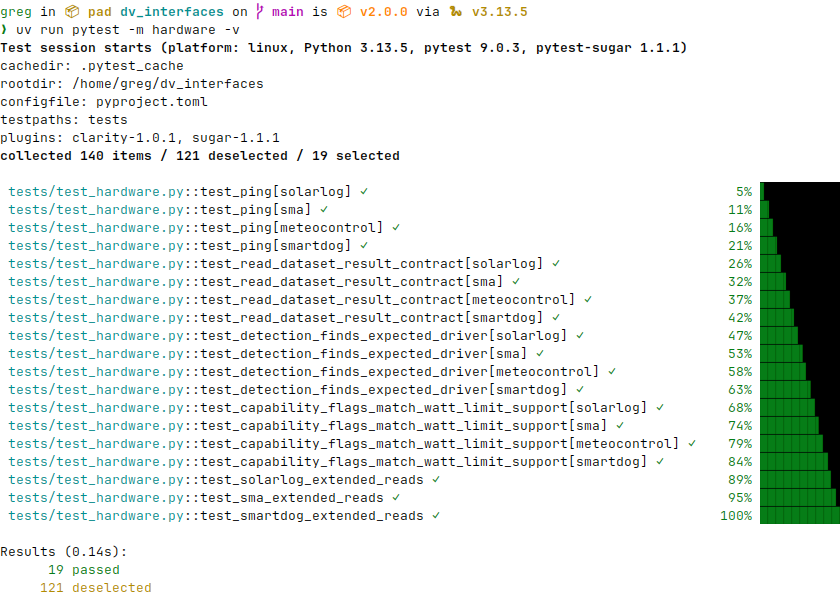
Set at least one DV_TEST_<DRIVER>_HOST environment variable, then run pytest with the hardware marker:
Any driver whose host variable is not set is automatically skipped — you do not need to comment anything out.
Test multiple drivers at once by setting several variables:
DV_TEST_SOLARLOG_HOST=192.168.1.100 \
DV_TEST_SMA_HOST=192.168.1.101 \
DV_TEST_METEOCONTROL_HOST=192.168.1.102 \
DV_TEST_SMARTDOG_HOST=192.168.1.103 \
uv run pytest -m hardware -v
Environment variables
Required (one per driver)
| Variable | Driver |
|---|---|
DV_TEST_SOLARLOG_HOST |
SolarLog |
DV_TEST_SMA_HOST |
SMA |
DV_TEST_METEOCONTROL_HOST |
Meteocontrol |
DV_TEST_SMARTDOG_HOST |
SmartDog |
The value is the device hostname or IP address.
Optional (per driver)
Each driver accepts optional overrides using the prefix DV_TEST_<DRIVER>_:
| Suffix | Type | Default | Description |
|---|---|---|---|
_PORT |
int | 502 |
TCP port |
_SLAVE_ID |
int | driver default | Modbus slave ID |
_TIMEOUT |
float | 5.0 |
Connection timeout in seconds |
_MAX_RETRIES |
int | 0 |
Register-read retries before raising |
_RETRY_DELAY |
float | 0.2 |
Seconds between retries |
Example — test SolarLog on a non-standard port with a 10 s timeout:
DV_TEST_SOLARLOG_HOST=192.168.1.100 \
DV_TEST_SOLARLOG_PORT=5020 \
DV_TEST_SOLARLOG_TIMEOUT=10.0 \
uv run pytest -m hardware -v
Using a simulator
Any Modbus TCP simulator can substitute for real hardware. Point the host and port variables at the simulator's address and run as normal:
DV_TEST_SOLARLOG_HOST=127.0.0.1 DV_TEST_SOLARLOG_PORT=5020 \
DV_TEST_SMA_HOST=127.0.0.1 DV_TEST_SMA_PORT=5021 \
DV_TEST_METEOCONTROL_HOST=127.0.0.1 DV_TEST_METEOCONTROL_PORT=5022 \
DV_TEST_SMARTDOG_HOST=127.0.0.1 DV_TEST_SMARTDOG_PORT=5023 \
uv run pytest -m hardware -v
What the tests cover
Each driver runs the same set of shared tests:
| Test | What it checks |
|---|---|
test_ping |
TCP connection succeeds and ping() returns True |
test_read_dataset_result_contract |
read_dataset_result() returns a valid DVReadResult; production and consumption are non-negative integers |
test_detection_finds_expected_driver |
detect_interface() identifies the correct driver on the expected port |
test_capability_flags_match_watt_limit_support |
supports_dv_percent_limit is True; supports_dv_watt_limit matches known per-driver capability |
Plus driver-specific extended tests:
| Test | Driver | What it checks |
|---|---|---|
test_solarlog_extended_reads |
SolarLog | status(), read_possible_production_w(), read_battery_charge_w(), read_battery_discharge_w() |
test_sma_extended_reads |
SMA | read_grid_frequency_hz() (45–65 Hz or None), read_battery_soc_percent() (0–100 or None) |
test_smartdog_extended_reads |
SmartDog | read_limitation_dv_w(), read_battery_soc_percent() |